We make Walkmic, one of the apps on this list. It is in development.
Pick field report software by the report you send after a site visit, and by where you write it: on the walk, or at your desk that night. If you need an app for your own firm today, Deltek ArchiSnapper (for A&E firms) and Part3 are built for architects. If the contractor already runs the job in Procore, Fieldwire or Raken, work in their app. If your team already runs checklists, Mitti or Fulcrum fits, and CompanyCam fits a visit that starts from photos. If you want to talk on the walk and leave with the report drafted, Walkmic is being built for that.
This page is for the architect in a small firm who needs field reporting software for the report to the owner after every visit. You will see which tool fits which firm, what each one does with photos, punch items and guests, and the biggest drawback of each. Every fact about another product links to its source (how we check facts).
We have no affiliate links and no partners among the other apps. We say where Walkmic does not fit. If you want the beta invite, join the waitlist.
How we compared them
We looked at what an architect needs from a field report app on a site visit:
- Field report and voice: does the tool make a report for the owner, or a task list, daily log or form? Can you talk instead of type, and what does the tool do with what you say?
- Photos for each observation: can you attach photos to each item, not only to the visit?
- Punch items on the drawing: can you pin an item to a spot on the plan?
- Guests without a seat: can the owner and the contractor read the report, or reply, without a paid account?
- Offline: does capture keep working in a basement with no signal?
- Devices: iPad, iPhone, Android or a browser.
- Price model: per user, per firm, or by project volume, as each company lists it.
We used the vendors' own pages, help centers and app store listings. Facts were checked on 3 November 2026. The Fieldwire prices and App Store listing, the Mitti free plan, Mitti AI Issue Creation, the Mitti and Raken pages we cite for site visits and AI, Procore Quick Capture and Deltek's description of ArchiSnapper were checked again on 4 November 2026. Prices change often, so check the source before you buy.
Field report apps at a glance
| Tool | Voice | Field report | Guests | Devices | Price as listed |
|---|---|---|---|---|---|
| Deltek ArchiSnapper | Not stated | Branded PDF field reports, items pinned on plans | Item list link with no account | Android, iOS, web browser | No public prices; 14 day free trial |
| Part3 | Not stated | Field reports with pins; drawing prints with the PDF | Project team on the distribution list; free collaborator seats | Web app added to the home screen | Core $150, Complete $200 per user per month, billed annually |
| Mitti | Speech to text notes; AI suggests issue fields from a voice note | Inspection reports as PDF, Word or a web link | Public report links | iPhone, iPad, web | Free plan up to 10 seats; paid Premium plan |
| Fieldwire | Voice task creation, beta sign up | Task reports (PDF, CSV); daily reports in Forms | Email report on Pro and Business, no account needed | iOS, Android | Basic $0; Pro $39, Business $64, Business Plus $89 per user per month, billed annually |
| Procore | Quick Capture fills punch items from dictation (2022) | Observations; punch list and daily log export to PDF | No charge for more users | iOS, Android | Custom quote by product and construction volume |
| CompanyCam | AI drafts a document from voice and photos (Crew, Scale and Enterprise plans) | Editable document you review before you share | Clients view reports with no account | iOS, Android, web | Core $63, Crew $129, Scale $199 per month, billed annually |
| Raken | Voice to text notes | Branded daily report PDF with photos | PDF to a distribution list; free collaborators | iOS, Android, web | Basic $23 and Performance $59 per user, billed annually, minimum 3 users |
| Fulcrum | Audio FastFill dictation on Elite and Enterprise | Custom PDF reports from field records | Not stated | iPhone, iPad, Android | Professional $43, Elite $55 per user per month, annual, minimum 5 users |
| Walkmic | AI drafts the field report from voice and photos; you review and sign (planned) | Field report with pins on the drawing (planned) | Free guest link, no account (planned) | iPad, iPhone, Android (planned) | In development |
Prices as listed, checked on 3 November 2026; Fieldwire prices checked again on 4 November 2026. "Not stated" means we found no primary source either way.
Deltek ArchiSnapper
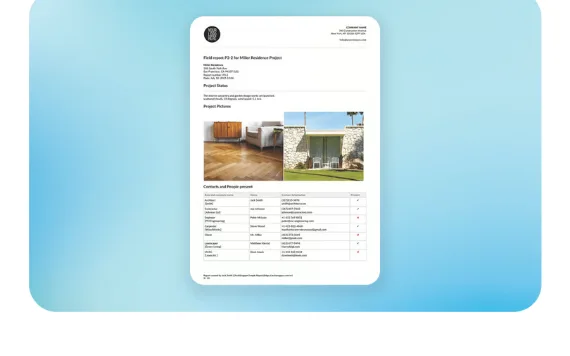
What it is: Deltek describes ArchiSnapper as "a mobile field reporting and punch list app built for A&E firms of any size" (Deltek). You capture photos, annotate drawings, log observations and record weather conditions on an Android or iOS device, and the app builds a PDF field report with your company's branding from what you captured. It also runs in a web browser on a laptop.
Best if: you run an architecture or engineering firm and want one app for site visit reports and punch lists.
Strengths:
- Items go on the floor plan: you tap a spot and add an item with photos, assignees and a status (Deltek).
- Report templates take your firm's logo, header and footer (same page).
- You can share a filtered item list as a link with "no ArchiSnapper account required". Assignees who reply get a free ArchiSnapper account that shows their open items (same page).
- Reports go by email as a PDF. Above about 7 MB, the app sends a link instead (Deltek help).
Biggest drawback: Deltek shows no public prices, so you have to ask. We also found no primary source on offline use.
Price: no public prices; a 14 day free trial (Deltek).
Verdict: a close fit for an architect's field report. Check the price and offline use in the trial before a busy closeout.
Part3
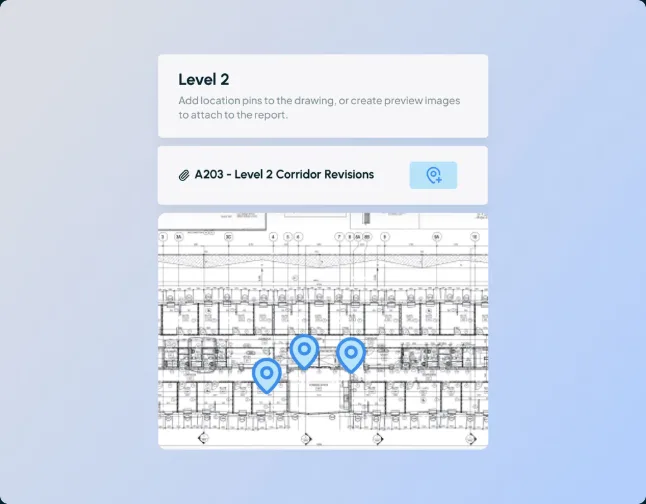
What it is: Part3 calls itself a construction administration platform built for architects, for submittals, RFIs, drawings and field reports (Part3). Its field reports page says you capture observations, photos, plan locations and follow ups, even offline, and issue a consistent report before you leave the site (Part3).
Best if: your firm wants every construction administration job in one platform, not only the field report.
Strengths:
- Report items can be pinned on a drawing, and the drawing prints at the back of the report PDF with its pins (Part3 help).
- Report items export as a punch list in a CSV file you can share with the general contractor (Part3 help).
- Site reports work offline. The Distribute button goes away until you are back online (Part3 help).
- Both plans list unlimited free collaborator seats (Part3 pricing).
Biggest drawback: the price. Part3 says annual subscriptions start at $9,000 a year (Part3). It is also a web app you add to the home screen; we found no App Store or Google Play listing (Part3 help). The report link goes to people on the distribution list, who must be on the project team (Part3 help).
Price: Core $150 and Complete $200 per user per month, billed annually in USD (Part3 pricing). The AI features it lists are for submittals and drawings, not field reports.
Verdict: a strong fit if you want submittals and RFIs next to the field report and the budget allows it. For a firm that only needs the site visit report, it is a lot of platform.
Mitti
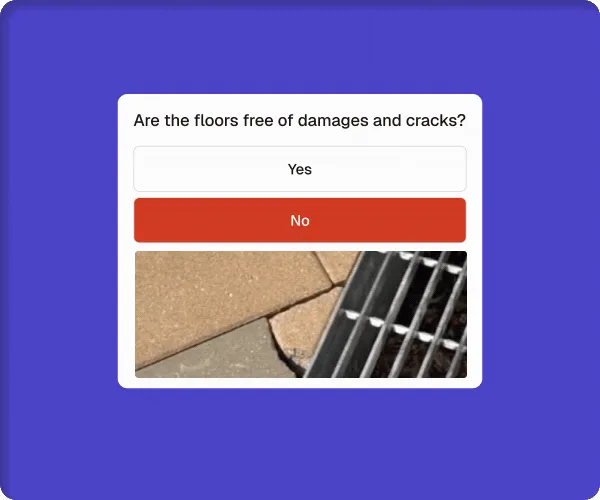
What it is: Mitti, formerly SafetyCulture (Mitti), is an inspection and checklist platform. Its inspections page lists site visits among the checks it is used for (Mitti). You complete checks on a phone or tablet, with automatic saving, offline sync, speech to text notes and photo annotation (Mitti).
Best if: your team already runs inspections in Mitti and you want site visits in the same place.
Strengths:
- Completed inspections export as PDF or Word files, or as web report links. Word export needs Premium or Enterprise (Mitti help).
- Report links are public links you can share with anyone to view in a browser, on any Mitti plan (Mitti help).
- You can add photos to each question and annotate them (Mitti help).
- With AI Issue Creation, you record a voice note and add photos, AI suggests the issue fields, and you review them before you submit. An admin must turn it on, and the help page covers the mobile app (Mitti help).
Biggest drawback: Mitti reports come from inspection templates and checklists, not a written site visit report to the owner. Offline, you can edit only inspections stored on your device (Mitti help).
Price: a free plan for teams of up to 10 seats, and a paid Premium plan (Mitti pricing).
Verdict: good value if your firm already lives in checklists. Less natural if your report is written observations to the owner.
Fieldwire
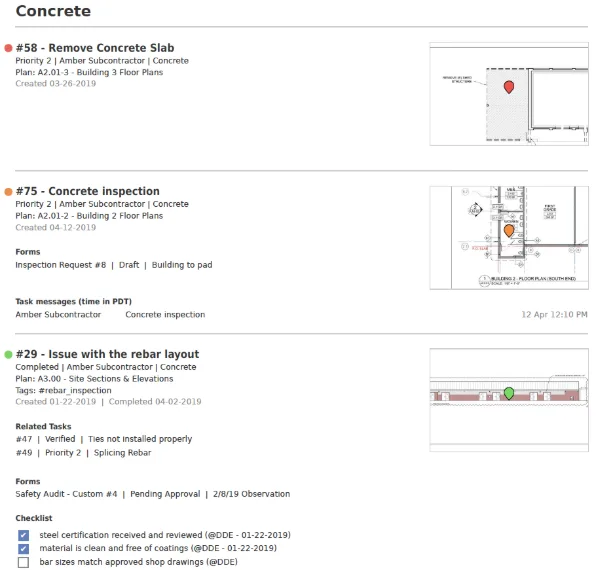
What it is: Fieldwire, which brands itself "Fieldwire by Hilti" (Fieldwire), is a construction app for iPhone and iPad (App Store). You create tasks directly on a plan, with messages, checklists and photos (Fieldwire help).
Best if: the contractor already runs the job in Fieldwire, and your observations can live as tasks on the plans.
Strengths:
- Task reports come as a PDF summary, a detailed PDF with images and annotations, or a CSV (Fieldwire help).
- A report can go to any email address: "the recipient does not need to have a Fieldwire account or be invited to your project" (same page).
- The mobile apps for Android and iOS work online or offline (Fieldwire help).
Biggest drawback: the report is a task report, and task reports are for Pro and Business users. Daily reports with site conditions, photos and a signature sit in the Forms module for Business and Business Plus (Fieldwire help). Fieldwire also says "Fieldwire is priced per user, so adding subs will increase your user count" (Fieldwire help). Voice task creation shows on its AI page under a beta sign up (Fieldwire).
Price: Basic $0. Billed annually, Pro is $39, Business $64 and Business Plus $89 per user per month (Fieldwire pricing).
Verdict: a fit when the contractor's tasks are your report. For a written site visit report, plan on a paid tier.
Procore
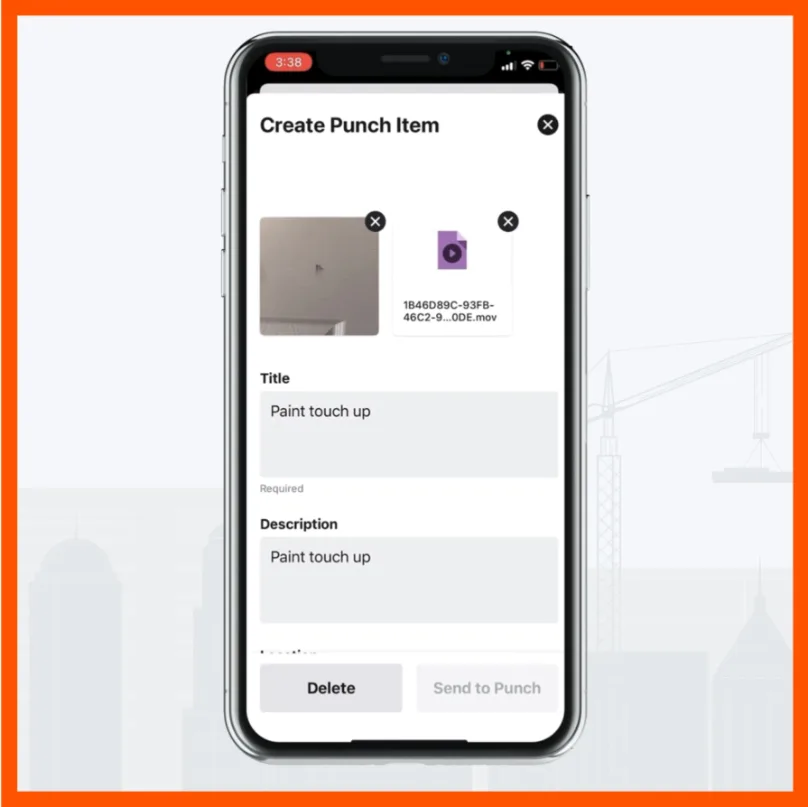
What it is: Procore's project tools include Observations, a Punch List tool and a Daily Log. Observations can be created from an inspection or a drawing, and Procore keeps them separate from substantial completion items in its Punch List tool (Procore). The Daily Log holds daily activities with the weather and exports to PDF (Procore support).
Best if: the contractor already runs the project in Procore and invites you in.
Strengths:
- Procore says it will "never charge you for adding more users", including clients, subcontractors and vendors, except for its Field Productivity product (Procore pricing).
- Punch items export as PDF (Procore support).
- In a September 2022 blog post, Procore said Quick Capture lets a user record video while dictating, and the tool fills punch item details (Procore).
- The iOS and Android apps work offline; new project data needs a connection (Procore support).
Biggest drawback: no public prices. Procore quotes an annual fee by product, based on annual construction volume (Procore pricing). If you are a small architect firm, ask whether the contractor will invite you to its account.
Price: custom quote (Procore pricing).
Verdict: use it when the contractor runs the job there. For your own firm's reports, compare the quote with the tools above.
CompanyCam
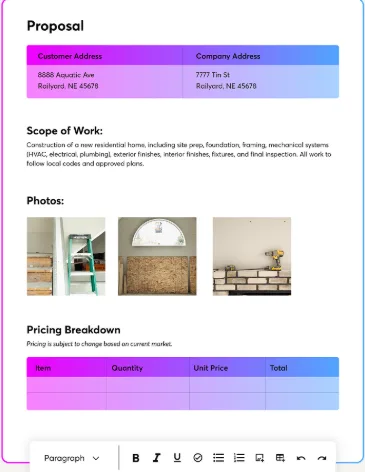
What it is: CompanyCam says it "helps contractors build trust with their crews and customers through photo documentation". Its AI page says: "Snap a photo, talk through what you see, and let AI spin up your field reports, checklists, captions, and updates" (CompanyCam).
Best if: photos lead your visit and you want AI to draft the write up from your voice.
Strengths:
- With a walkthrough, CompanyCam AI organizes your voice and photos into an editable document, and you review and edit it before you share (CompanyCam).
- "Clients don't need an account to view a Gallery, Timeline, Report, or Page" (CompanyCam help).
- Documents export as PDF or share by link (CompanyCam help).
- Walkthroughs work with offline mode in the mobile app, up to 15 minutes each (CompanyCam help).
Biggest drawback: it is built for contractors, and we found no primary source that shows items pinned on drawings. AI templates use AI credits (same help page). AI features are in the Crew, Scale and Enterprise plans (CompanyCam pricing).
Price: Core $63, Crew $129 and Scale $199 per month, billed annually. Core includes 1 user, Crew and Scale include 3, and more users are $29 each (CompanyCam pricing). A 14 day free trial is offered (CompanyCam).
Verdict: close to walk and talk reporting today, built for contractors. If you need items pinned on the drawing, check for that in the 14 day trial; we found no CompanyCam source that shows it.
Raken
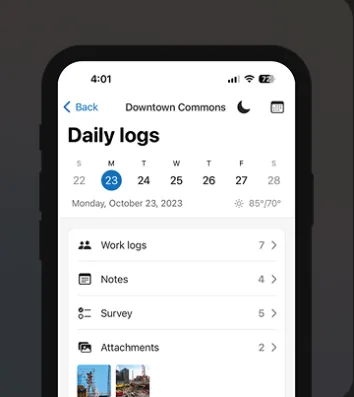
What it is: Raken calls itself a construction management platform for the field, built for general contractors, subcontractors and specialty contractors. It runs on iOS, Android and web browsers (Raken help).
Best if: your report looks like a contractor's daily report: who was on site, notes, photos, signed and sent.
Strengths:
- Daily reports are customizable and produce a branded PDF with photos and videos attached (Raken).
- People on the distribution list get the PDF each time a daily report is signed (Raken help).
- You can type notes or dictate them with speech to text (Raken).
- Raken says collaborators are free to invite and do not use your paid licenses (Raken help).
Biggest drawback: it is built for contractors' daily logs, not the architect's observation report. Its AI page lists photo tagging, photo ID and an MCP integration, not AI written reports (Raken), and we found no primary source that shows items pinned on drawings. Offline works in the mobile app only, with the 5 most recently active projects cached (Raken help).
Price: Basic $23 and Performance $59 per user, billed annually in USD, minimum 3 users (Raken pricing). A free trial is available for new accounts (Raken help).
Verdict: a solid daily report tool for contractors. An architect firm will bend it to fit.
Fulcrum
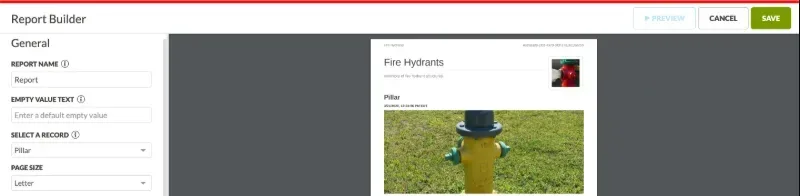
What it is: a field data collection platform from Spatial Networks, with a page for engineering and construction firms. Its pages do not describe architect field reports, pins on drawings or punch lists (Fulcrum).
Best if: your firm wants to design its own field forms and PDF reports, and has five or more users.
Strengths:
- Reports turn field records into customizable PDF documents, and the Basic Report Builder is on all plans (Fulcrum docs).
- Audio FastFill fills forms by voice dictation on the Elite and Enterprise plans (Fulcrum help).
- The iPhone and iPad app captures data offline and syncs later, and it is also on Google Play (App Store).
Biggest drawback: you build the report yourself, and "All plans require an annual subscription and a minimum of five users per organization" (Fulcrum pricing).
Price: Professional $43 and Elite $55 per user license per month, annual subscription, minimum five users; a free trial is offered (Fulcrum pricing).
Verdict: flexible for firms that like to build forms. The five user minimum and the setup are a lot for a three person office that wants a site visit report.
How to choose
Answer these six questions before you pick:
- Who runs the project software? If the contractor runs the job in Procore or Fieldwire and invites you, start there. If you choose for your own firm, look at ArchiSnapper and Part3 if you need an app now, and at Walkmic if you want the report drafted while you walk.
- Is your report written observations or a checklist? A narrative site visit report fits ArchiSnapper or Part3. A checklist fits Mitti or Fulcrum. A contractor's daily log fits Raken.
- Do you need items on the drawing? ArchiSnapper, Part3, Fieldwire and Procore describe items or observations on plans. For Raken, CompanyCam and Fulcrum, we found no primary source that says so.
- Who needs to read or reply without a seat? Count the owner, the contractor and each trade. Check whether guests can only read a PDF or also reply.
- What is your budget per person? Per user prices grow with each editor. Part3 starts at $9,000 a year, and Fulcrum needs five users. If you only want a report today, our free field report template and site visit report template cost nothing.
- When does the report get written? If you type it at your desk after each visit, pick a tool that finishes it on site. Part3 says you can issue the report before you leave, and CompanyCam drafts a document from your voice and photos. Walkmic is being built to draft the architect's report from your walk, for you to review and sign.
If you used Revu for iPad on site visits, our page on Revu for iPad alternatives covers what changed and what to save.
Where Walkmic fits
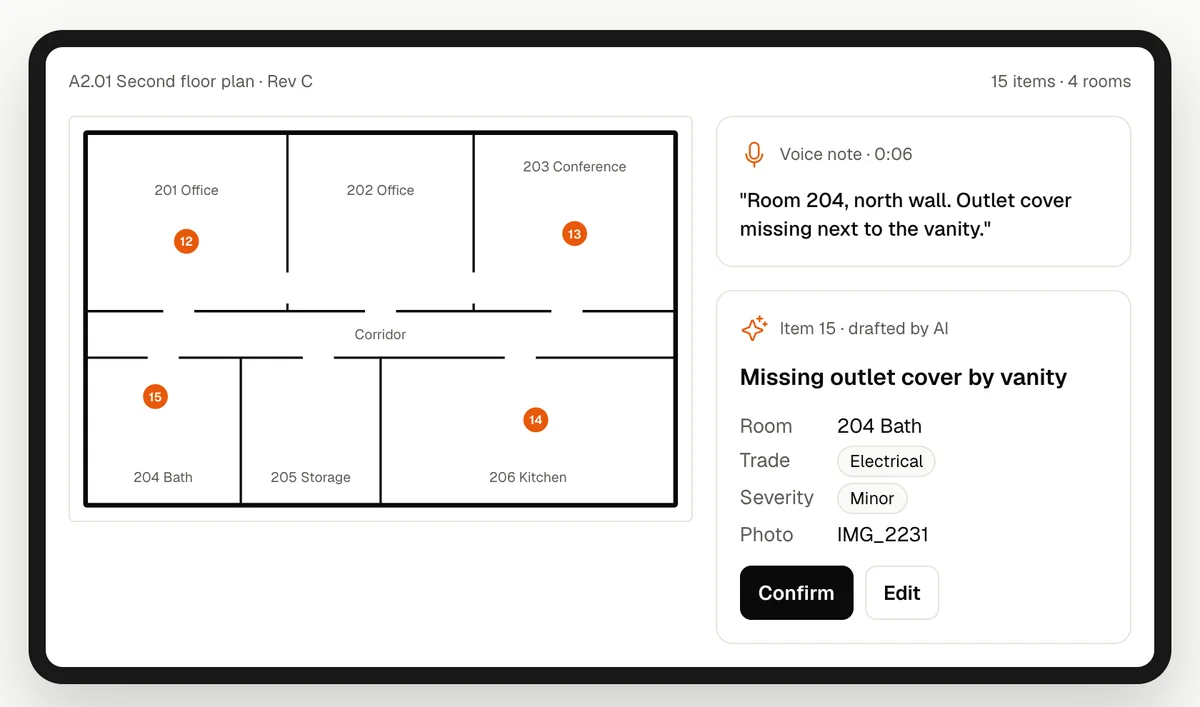
What it is: an app we are building for the architect's field report, planned for iPad, iPhone and Android. You walk the site and talk, and take photos. Before you leave, AI drafts the field report: the progress you saw, your observations, the people and trades on site, and the items that need action, pinned on the drawing with their photos. The date and weather fill in automatically. You review every line, fix what is wrong and sign it.
Best if: you run a small firm, you do the site visits yourself, and the report is the part you type at your desk after the walk.
Strengths (planned):
- One walk, one report: your voice notes and photos become the report to the owner, not a task list or a checklist that you turn into a report later.
- Items go on the drawing with their photos, inside the same report.
- You open any PDF from Files, Mail or a cloud drive, with no project to set up.
- Guests are always free. The owner and the contractor open one link in any browser with no account, and trades reply, add a photo of the fix and close their items.
- Notes, pins and photos are built to save on the device first, so a basement with no signal does not stop the visit. That is a design goal until it ships and is tested.
Biggest drawback: you cannot use the app today. The beta is planned for early 2027. It also does no RFIs or submittals (look at Part3 for those), has no Revu tool set import and no sync with Revu on the desktop, and the AI does not check building code, accessibility or safety rules. You review and sign every report.
Price: a free plan with no time limit and a 14 day free trial of Pro are planned, and guests are always free. See pricing for Pro and the early access price.
Verdict: a fit for a small firm that wants the report drafted on the walk and guests who pay nothing. Not a fit if you need an app before early 2027, or RFIs and submittals in the same tool.
How the Walkmic plan compares
Voice to report is not new, and we do not claim it is. Here is how the plan compares with the apps above, using the facts on this page:
- Part3 also says you can issue the report before you leave the site, with items pinned on the drawing. Its subscriptions start at $9,000 a year, and the report link goes to people on the distribution list, who must be on the project team. Walkmic plans a free plan and a Pro plan (pricing), and guests open the link with no account.
- CompanyCam drafts an editable document from your voice and photos today. It is built for contractors, and we found no primary source that shows items pinned on drawings.
- Deltek ArchiSnapper pins items on the plan and builds a branded PDF report for A&E firms.
- Mitti suggests issue fields from a voice note and photos, and you review them before you submit. Its reports come from inspection checklists.
- Procore described Quick Capture for punch items in 2022. It fits best when the contractor already runs the project in Procore and invites you in.
Next step: pick the two tools above that match your firm and run one real site visit in each. If you want the report drafted while you walk, try the free field report maker on your next visit and join the Walkmic waitlist for the beta invite.
Fieldwire is a trademark of Hilti. Deltek and ArchiSnapper, Part3, Mitti and SafetyCulture, Procore, CompanyCam, Raken, Fulcrum, Bluebeam and Revu, Apple and iPad belong to their owners, as do other product names on this page. Walkmic is not affiliated with any of them. Facts checked on 3 and 4 November 2026.